

How to Watch Padres Spring Training Games

Padres fans will be able to watch select Spring Training broadcasts FREE on Padres.TV, presented by UC San Diego Health, and can enjoy a total of 30 preseason games via television, radio or livestream.
To watch Padres.TV during Spring Training, simply visit the Broadcast Schedule below before game time, new users create a username and password (existing subscribers simply log in), and start watching on your favorite supported devices – no credit card required. Padres.TV will be available for only $19.99 a-month/$99.99 for the full regular season.
Additionally, for fans watching through their local cable provider or video distributor, channel locations can be found using the channel finder below. Select Padres radio broadcasts will air on 97.3 The Fan and can also be streamed through the Audacy app. Select away games will also be available as audio livestreams on Padres.com.
Learn more about Padres.TV and view the complete 2026 Spring Training broadcast schedule using the buttons below.
Additional information on where to watch 2026 Padres regular season games will be announced prior to the Padres home opener on March 26.
Channel Finder - Where to Watch Padres Games
PADRES.TV FAQs
How can I watch the Padres during Spring Training?
Stream select Padres games free on PADRES.TV. Simply visit the Broadcast Schedule above before game time, new users create a username and password (existing subscribers simply log in), and start watching on your favorite supported devices. A credit card is not required to watch Padres Spring Training games on PADRES.TV.
How Do I Stream PADRES.TV in the San Diego area?
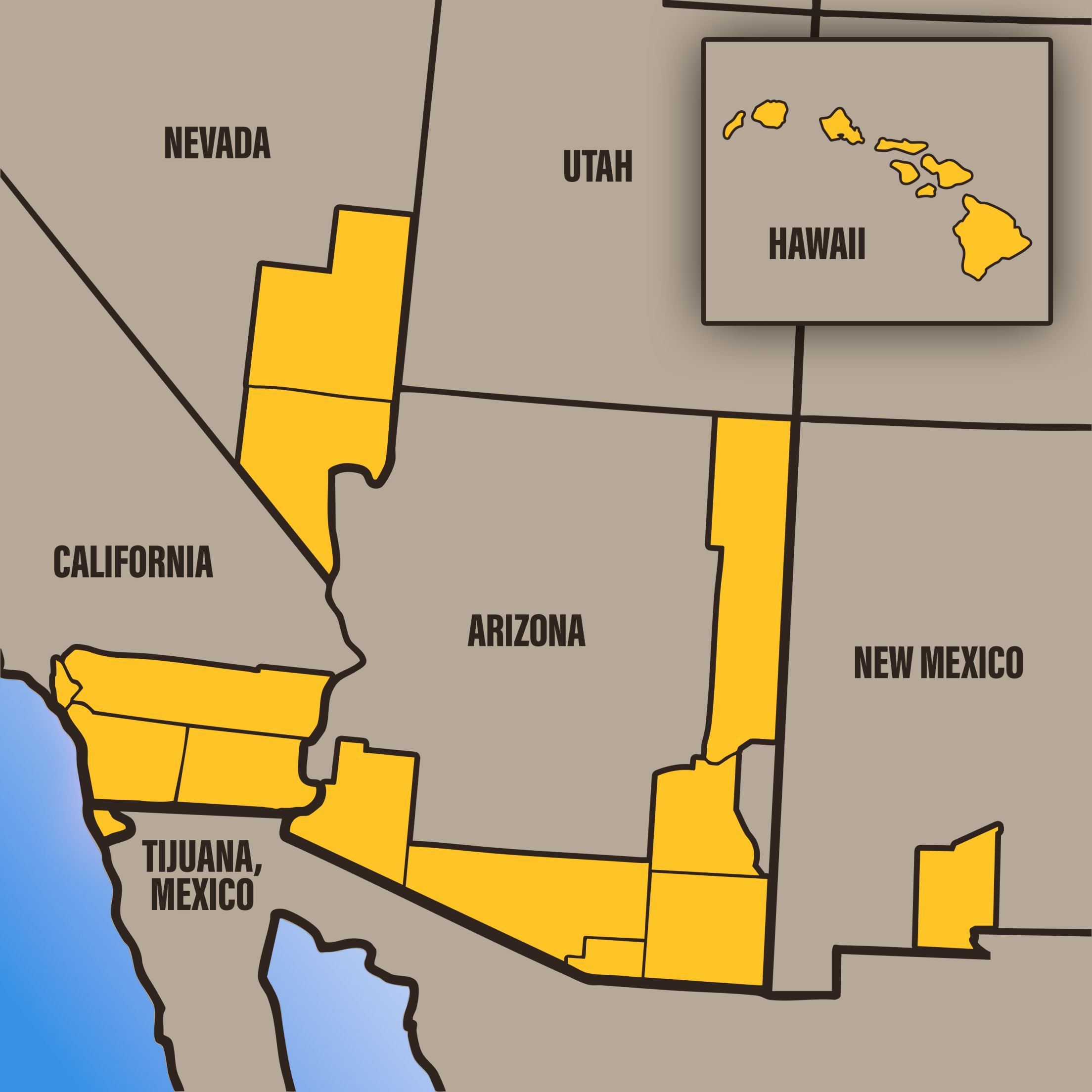
PADRES.TV subscribers located in San Diego, Tijuana, and the club’s home television territory are able to access San Diego Padres games. This offer is a separate service than the MLB.TV out of market package.
PADRES.TV will be offered for $19.99 per month (available for purchase beginning March 23) or $99.99 for the full regular season.
How do I watch Padres baseball if I live outside of the San Diego area?
Existing out-of-market yearly and monthly subscribers, including subscribers who received a subscription via T-Mobile, can continue to watch San Diego Padres games on MLB.TV. Non-subscribers will need to purchase an MLB.TV Yearly or Monthly subscription in order to watch. Full details on all MLB.TV product offerings can be found here.
How do I know if I live in the Padres home territory?
A map of the Padres home television territory is below. You can also use the Channel Finder to enter your zip code.
Can MLB.TV All Teams Subscribers Watch Padres games on MLB.TV in the San Diego area?
Only users that have specifically purchased the 2026 PADRES.TV Package or the PADRES.TV/ MLB.TV Bundle subscription will be able to stream Padres games in the San Diego area or the club’s home television territory. MLB.TV All Teams out-of-market subscribers will not have access and will need to purchase PADRES.TV in order to stream Padres games in the San Diego area.
If I’m a Padres Season Ticket Member with MLB.TV, what does this mean for me?
Padres Season Ticket Members receive a free MLB.TV All Teams Subscription as a membership benefit. However, only users that specifically purchase a PADRES.TV subscription will be able to stream Padres regular season games in San Diego, Tijuana, and the club’s home television territory. Members need to add-on this package. Members should not enable their free MLB.TV All Teams subscription to watch Padres home games. Instead, they should subscribe to the new PADRES.TV package.
Blackout Policy
Due to certain Major League Baseball national exclusivities, select regular season, special event, and Postseason games are unavailable on MLB.TV domestically and internationally. Live audio of the games that are unavailable is available to customers within At Bat, which is included with all MLB.TV subscriptions.
Live audio of all 30 MLB teams is included with Padres.TV subscriptions.
Web:
- Select the San Diego Padres game you wish to view from the Multimedia Center. You will be prompted to enter your Username and Password.
- As long as the computer meets the system requirements then you can log in with your registered email address and password to access your subscription from anywhere at any time.
- Sharing of your username and password is strictly prohibited. For more information, please click here.
- All games are subject to blackout restrictions and exclusivities. Click here for more details.
Mobile & Connected Devices
- To watch San Diego Padres games on mobile and connected devices, download the MLB app and select the game you wish to view.
- You will be prompted to enter your Username and Password.
- Sharing of your username and password is strictly prohibited. For more information, please click here.
- All games are subject to blackout restrictions and exclusivities. Click here for more details
Device Availability
For a full list of supported devices click here
PADRES.TV Support
If you are having issues accessing a game or have questions about your account you can visit our full online Support Page. You can also call our toll-free support (866.244.2291), email by clicking here, on Social @MLBFanSupport or via Virtual Assistant.
Free Trial Policy
You may cancel a 7-day risk-free trial of PADRES.TV Yearly or PADRES.TV Monthly any time during the 7-day window and will still have access to PADRES.TV for the full 7 days. If you do not cancel, you will be billed on the 8th day for the current Yearly or Monthly subscription price. MLB reserves the right to determine customer eligibility for trial memberships in its sole discretion.
If you purchased a PADRES.TV subscription, the payment card you have on file with us will be billed monthly on approximately the same monthly date that you originally purchased, with monthly billing for each month of the 2026 MLB season through and including October. You can verify your monthly billing date in your MLB Account under “Manage Subscriptions.”
Payment Methods
Accepted payment methods include: MasterCard, Visa, American Express, Discover, Masterpass, and PayPal.
Please note: The payment and billing information entered above will be stored as your primary payment card in the Manage Subscriptions section of your MLB Account. If you save alternative payment cards to the Manage Subscriptions section of your MLB Account, you authorize us to charge such payment card(s) in the event we are unable to process charges to the primary payment card entered above. If the account number, expiration date or debit card account associated with your subscription changes, we recommend you update it as soon as possible. Please also be aware, MLB may acquire this current information from our financial services partner(s) and update the Manage Subscriptions section of your MLB Account to include such revised payment information.
PADRES.TV Cancellation Policy
You may easily cancel your PADRES.TV subscription any time before your next billing period in your MLB Account, under the Manage Subscriptions tab, or by contacting customer service at 866-244-2291 or contacting us here. (International Customers please call 315-203-6761).
PADRES.TV Auto-renewal Details
PADRES.TV Yearly: By clicking “Buy and accept terms,” you agree to the MLB.com Terms of Use and the MLB.com Privacy Policy. You also agree that your subscription to PADRES.TV Yearly will automatically renew annually on or about March 1 at the then-current year’s regular full yearly price. You can cancel your automatic renewal any time before the billing period.
PADRES.TV Monthly: By clicking “Buy & Accept Terms,” you agree to the MLB.com Terms of Use and the MLB.com Privacy Policy. You also agree that your subscription to PADRES.TV Monthly will renew monthly through and including October, and will automatically renew annually on or about March 1 each year at the then-current year’s regular full monthly price. You can cancel your automatic renewal any time before the billing period.